See the agent work an invoice
Watch the agent work four sample invoices live, each one forcing a different path.
Try the live demo →Hosted free, so give it a moment to wake (30 to 60 seconds on first load). It runs the model live in your browser, so you watch it choose each action in real time. Under heavy load it can hit the free API rate limit; when that happens it falls back to a clearly labeled sample run and returns to live on the next invoice.
Most "AI" features are retrieval pipelines: the steps are fixed by the designer. This is different. It's an agent. I gave a language model a set of accounting tools and ran it in a loop, and the model itself decides which tool to call next based on what it just learned, iterating toward a goal.
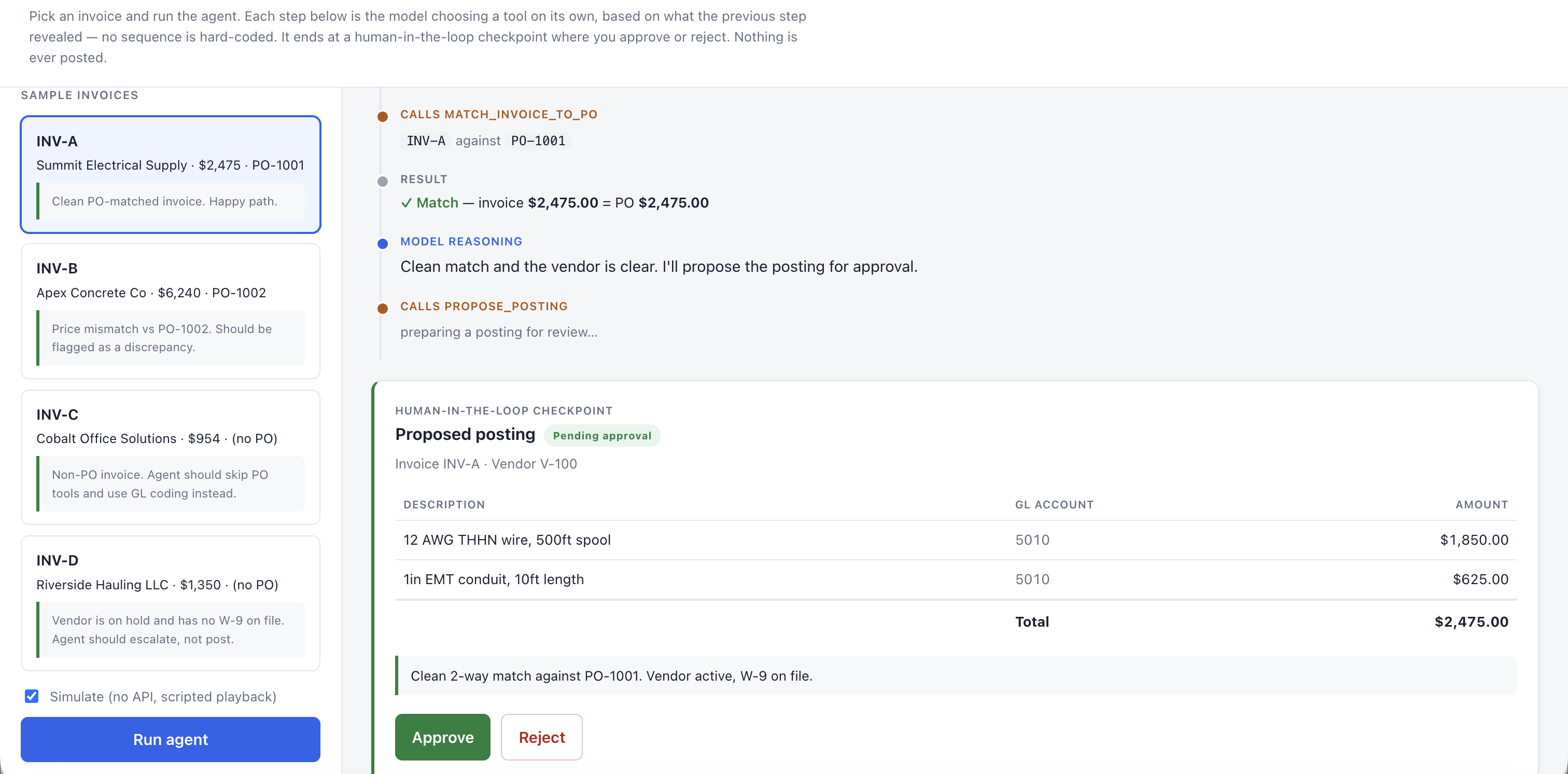
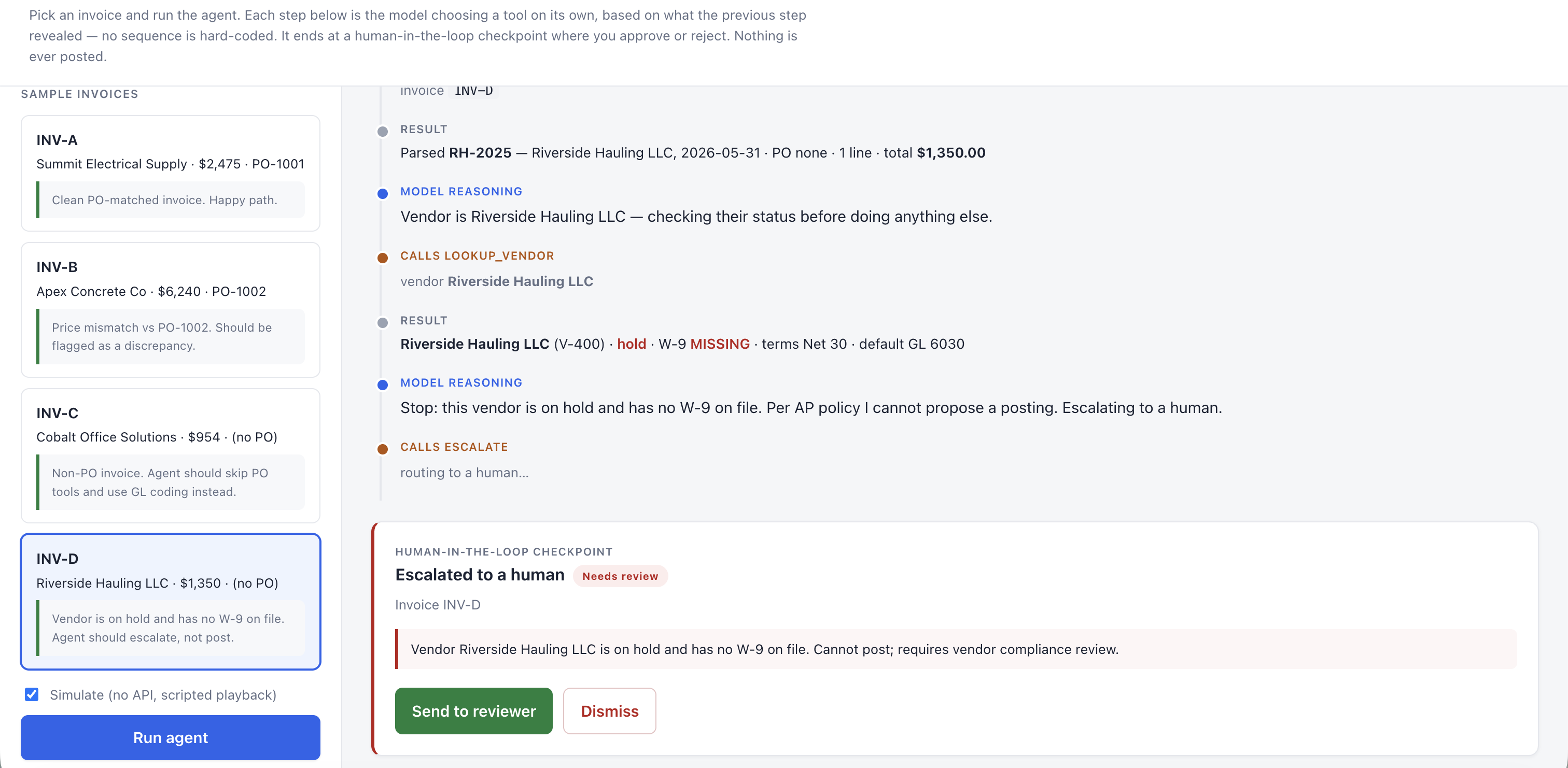
The task is accounts-payable invoice processing. Hand it an invoice and it works out its own path: parse the invoice, validate the vendor, pull and match the purchase order, flag discrepancies, code the GL, then stop at a human-approval checkpoint, because in finance a machine prepares and a person authorizes. Every decision is an inspectable audit trail.
I designed it and directed Claude Code to build it. The agent itself is model-agnostic, built to run on Gemini or Claude; the live demo runs on Gemini 3.1 Flash Lite with function calling, the same stack as my Construction-Accounting RAG. Together they show two tools for two different problems.
The interesting part wasn't making it work. It was deciding what the model isn't allowed to judge.
What makes it an agent
The difference between an agent and a fixed pipeline is who decides the order of operations. In a pipeline, the designer hard-codes the sequence. In an agent, the model is given tools and run in a loop, and it decides which tool to call next based on what the last step revealed, iterating toward a goal. Nobody scripts the path. A different invoice produces a different path. That autonomy is the point.
Given a vendor invoice, the agent chooses its tools in whatever order fits the situation:
- Extract the invoice fields.
- Validate the vendor (active? W-9 on file? on hold?).
- Pull a referenced purchase order when the invoice cites one.
- Match invoice against PO and flag any discrepancies.
- Code lines to GL accounts when there's no PO to match against.
It never posts anything itself. Its final move always hands off to a human-approval checkpoint, mirroring real AP controls. And every step it takes is written to a visible audit trail. That inspectable reasoning is the differentiator. It comes straight from the accounting side of this: in finance, you don't trust a number you can't trace.
Four invoices, four paths
The demo includes four sample invoices. Each one forces the agent down a different path, which is how you can tell it's deciding rather than following a script.
What the model isn't allowed to decide
An early version told the model to escalate when a discrepancy was "large," and left large undefined. In testing, two different models made opposite calls on the same invoice: one escalated a 10% vendor overbill, the other proposed paying it in full. Same invoice, same instructions, different answer.
So the threshold came out of the prompt and went into code. Materiality is now deterministic: over $100 or over 2% is a variance, every time, no matter which model is driving. The model still decides which tool to call and in what order. It doesn't get to decide what counts as material.
This is the part that comes from the accounting side rather than the AI side. Agents are good at sequencing work and bad at being a policy. Anything that has to survive an audit belongs in code, where it's deterministic, testable, and identical on every run.
The decision trace
The agent shows its work. Each tool call and the reasoning behind it is laid out step by step, ending in either a proposed posting or an escalation, always pending a human's approval.
What I deliberately didn't build
The demo won't let you upload your own invoice. That's a decision, not a missing feature.
- The ERP data behind it is synthetic. A real invoice would fail every vendor and PO lookup and escalate every time, which would teach you nothing about the decision loop.
- Real invoices are confidential. They shouldn't pass through a public demo or a third-party model API.
- The point is the decision loop, not OCR. Pulling fields off a document is a solved and separate problem.
Scoping what a system won't do is as much of the design as scoping what it will.
RAG vs Agent
This sits next to my Construction-Accounting RAG demo, which answers plain-language questions grounded in a construction-accounting knowledge base. The two solve different problems, and the difference is worth being precise about.
RAG grounds the model's answers in retrieved knowledge. An agent lets the model choose and sequence its own actions in a loop. They compose, an agent can call RAG as one of its tools, but they are not the same thing.
| RAG | Agent | |
|---|---|---|
| Control flow | Fixed by the designer: retrieve, then generate | The model chooses its own next action |
| Best for | Grounded answers from a knowledge base | Multi-step tasks with branching decisions |
| Human role | Reads the answer | Approves the agent's proposed action |
| They compose | — | An agent can call RAG as one of its tools |
Two demos, two tools, two different problems. Try them both:
- AP Invoice Agent: the agent (this project).
- Construction-Accounting RAG: the retrieval demo.
Let's talk
If you've got a repetitive, rules-heavy process that still needs a human's judgment at the end, this is the shape of problem an agent fits. Reach out and I'll tell you whether it's a good candidate.
Get in touch →